
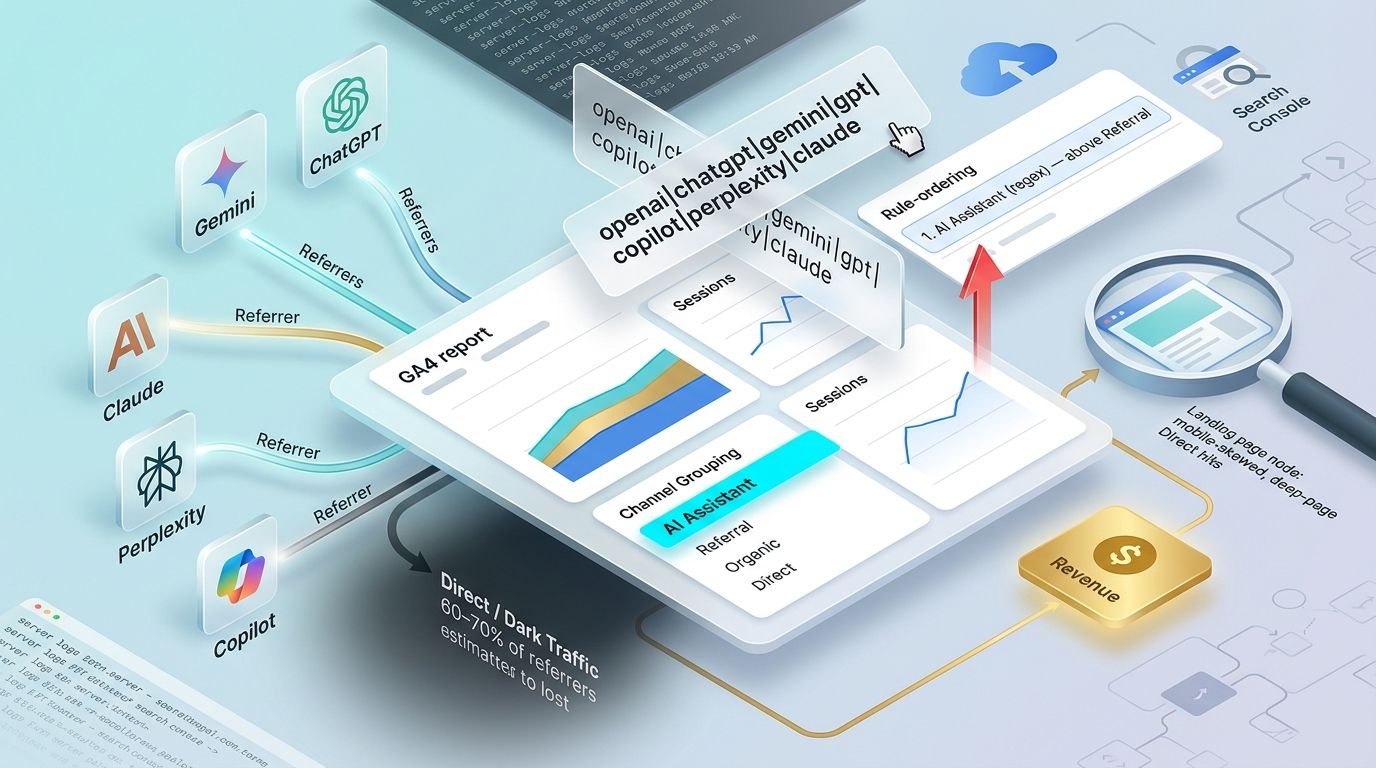
The measurement system has seven stages: classify AI traffic, verify retroactivity behavior, validate the sources, segment landing pages, connect revenue, compare against Organic Search, and patch the gaps GA4 cannot see. We run them in that order because each stage depends on the one before it, and because skipping the classification step poisons everything downstream.
Here is the operating premise before any of the steps: GA4's default acquisition report shows almost none of the traffic that AI assistants send us. ChatGPT, Gemini, Claude, and Perplexity route qualified visitors to deep product pages, but the default channel logic scatters those sessions into Referral and Direct. Our measurement system treats every visible AI session as a floor, not a total, because a large share of AI clicks never carry a usable referrer.
Deploy checklist for today:
- Build a custom AI Assistant channel group (Step 1): reaches backward, editable, works on any property.
- Confirm retroactivity behavior before trusting any number (Step 2).
- Validate the regex against real source data in an exploration (Step 3).
- Segment the landing pages AI answers point to (Step 4).
- Connect those sessions to key events and revenue (Step 5).
- Benchmark AI Assistant against Organic Search (Step 6).
- Patch the structural gaps with a layered stack (Step 7).
At each step we name the exact limit that comes with the capability, because attribution that ignores its own blind spots is a vanity dashboard.
What Counts as AI Assistant Traffic and Why Default GA4 Misses It
AI assistant traffic is any session that originates from a conversational AI product: ChatGPT and its openai.com surfaces, Google's Gemini, Anthropic's Claude, Perplexity, Microsoft Copilot, and the long tail of smaller answer engines like DeepSeek, Meta.ai, and Mistral-based tools. A visitor asks a question, the assistant returns an answer with a link or a cited source, the visitor clicks through, and lands on our site.
The problem is that GA4's default channel logic was built around four familiar buckets: Organic Search, Referral, Social, and Direct. An AI assistant fits none of them cleanly. When a referrer header is present, GA4 files the click under Referral alongside every random blog and forum link. When the referrer is missing, which happens constantly because people copy a link out of a chat window or use a mobile app that strips the header, the session collapses into Direct (SealMetrics).
That second case is the dark AI traffic problem, and it is the single most important number to internalize before we build anything. A large share of AI sessions, roughly on the order of 60 to 70 percent by practitioner estimates, arrive with no usable referrer and land in Direct. Any **AI number visible in GA4 is a lower-bound figure. We are measuring the minority that happened to carry a referrer.
There is no honest, single benchmark for how this traffic converts, and we distrust anyone who hands us one. Microsoft Clarity has published observations suggesting AI-referred visitors convert at around three times the rate of other sources, while Ahrefs has reported the opposite shape in its own data: higher bounce rates and fewer pages per session for AI arrivals. Both can be true. They are measuring different properties, different intents, and different slices of the visible traffic. The point of this playbook is rather than adopting someone else’s conversion number to produce our own, tied to our own revenue.
That is the real deliverable. Citation screenshots and prompt-rank tools tell us that an AI mentioned us. They do not tell us whether that mention produced a purchase, a lead, or a trial. Revenue attribution does, and that is the measurable outcome we are building toward.
How Each Assistant Appears in GA4 (A Trackability Comparison, Separate From Model Quality)
This section is about trackability rather than which model gives better answers. Some assistants are easy to catch in GA4 and some are nearly invisible, and the difference has nothing to do with model quality and everything to do with referrer behavior.
| Assistant | Referral domain(s) | GA4 default behavior | Attribution challenge |
|---|---|---|---|
| ChatGPT | chatgpt.com, chat.openai.com, openai.com | Referral when referrer present, otherwise Direct | Heavy copy-paste and app usage strips referrer |
| Claude | claude.ai | Referral when referrer present, otherwise Direct | App and copy-paste behavior, plus uncertain native status |
| Gemini | gemini.google.com | Referral, but risks blending into the Google ecosystem | Hard to separate from other Google-owned surfaces |
| Copilot | copilot.microsoft.com, copilot.com | Referral, overlaps with Bing and Microsoft apps | Ambiguity between search and assistant |
| Perplexity | perplexity.ai | Referral, generally passes referrer data | A classification gap, not a referrer-stripping one |
ChatGPT, Claude, Gemini, Copilot: Referrer Behavior and Where They Land
ChatGPT sends traffic from chatgpt.com and the older openai.com surfaces, and Claude sends from claude.ai (Search Engine Land). Both behave the same way in GA4: when the referrer survives the click, the session lands in Referral, but a large fraction arrives as Direct because users copy links out of the chat or open them inside the mobile app, which does not pass a web referrer.
Gemini presents a different challenge because it lives at gemini.google.com, inside the Google ecosystem. Its referrer can blend with other Google-owned surfaces, so isolating a clean Gemini signal requires more care than a simple domain match.
Copilot spreads across copilot.microsoft.com and copilot.com, and it overlaps with Bing and various Microsoft apps. That overlap makes it genuinely hard to say whether a given session came from the assistant or from adjacent Microsoft search and productivity surfaces.
Why Perplexity Behaves Like an AI Search Engine
Perplexity is the outlier for measurement. Because it is designed to cite sources and encourage users to click the outbound links behind its answers, it generally passes referrer data, and Perplexity sessions typically show up in GA4 carrying perplexity.ai as the source (Digital Applied).
The catch with Perplexity is a classification gap misread as a referrer-stripping problem. The data is there; GA4 simply files it under generic Referral because it has no reason to know perplexity.ai is an AI product. That is why Perplexity needs its own segmentation, separate from generic referral traffic: left alone, it sits in Referral next to every other referring domain, and its distinct behavior gets averaged away.
The Google AI Overviews and AI Mode Exclusion
One category will never appear in any AI channel we build from source and referrer, and we accept this up front. Google's AI Overviews and AI Mode are served inside the search results page, so when a user clicks a link from within an AI Overview, GA4 counts it as Organic Search, because the referrer is google.com. The source and referrer method physically cannot isolate it, since it carries the same referrer as an ordinary organic click. The only instrument that gives visibility into this surface is Search Console, which we return to in Step 7.
Step 1: Build the Custom AI Assistant Channel Group (The Deploy-Today Method)
This is the step we can complete quickly, and it works regardless of what native features the property has. It requires editor-level access to the property.
Go to Admin, then Data Display, then Channel Groups. Create a new custom channel group and name it something unambiguous like "AI Assistant." Inside it, add a new channel, name that channel as well, and define its rule using Source with a regex match against the patterns below.
[Screenshot: GA4 Channel Groups rule order, with the AI Assistant channel positioned above Referral and Organic Search]
The rule ordering is the part people get wrong and then quietly poison their reports. GA4 evaluates channel rules top to bottom and assigns each session to the first matching rule (UTMGuard). If the AI Assistant channel sits below Referral or Organic Search, those broader rules will grab the sessions first and the AI channel will show close to zero. Place it above Referral and above Organic Search in the ordering.
The dimensions available for building rules include Campaign ID, Campaign name, Default channel group, Manual ad content, Medium, Source, and Source platform. For this first build, keep it to Source matching, since that is where the assistant domains live.
Regex Source Patterns to Paste In
Start with a broad set that covers the major assistants and the most common long-tail tools:
openai|chatgpt|gemini|gpt|copilot|perplexity|bard|claude|deepseek|meta\.ai|mistral|anthropic|copy\.aiFor wider coverage, an extended set of roughly seventeen patterns picks up smaller and older answer engines that occasionally send meaningful traffic:
openai|chatgpt|chat-gpt\.org|gemini|bard|gpt|copilot|perplexity|claude|anthropic|deepseek|meta\.ai|mistral|copy\.ai|iask\.ai|writesonic\.com|neevaResist the urge to bolt on more dimensions inside this one group. Combining Source with Campaign name, Manual ad content, and Source platform in a single channel definition degrades the readability of every report that uses it. Keep the logic focused on Source.
Hard Limits to Plan Around Before You Commit
Custom channel groups are a scarce resource, so spend them deliberately:
- A Standard GA4 property allows only 2 custom channel groups; a GA360 property allows 5 (Google Analytics Help).
- Google's current documentation specifies up to 50 channels per custom group. Some third-party guides still cite 25, which appears to reference an older limit, so verify the number against the live UI before planning around it.
- Custom channel groups are not present in the BigQuery export schema. If revenue reporting runs through BigQuery, you cannot query the AI Assistant grouping directly and will have to reconstruct the logic from source and medium fields.
- These groups are also unusable in the Key events paths report.
- Deletion is irreversible. Removing a custom channel group breaks every report, audience, and dataset that depends on it, with no undo.
Step 2: Confirm Retroactivity Behavior Before Trusting the Numbers
Before reading anything into the numbers, understand which parts of GA4 apply the new definition backward and which do not, because the difference will mislead you otherwise.
In standard reports, explorations, and segments, custom channel groups apply retroactively (Google Analytics Help). The moment the definition is saved, GA4 applies it to the underlying historical data, so we can look at the last 90 days through the new AI Assistant lens even though the group did not exist yesterday.
Retroactivity stops at audiences. When a custom channel group feeds an audience condition, changes to the group only affect user eligibility going forward. Membership is not re-evaluated against history, so an audience built on AI Assistant traffic will only start filling from the moment it is defined.
There is also a primary channel group exception worth flagging. If a custom channel group is promoted to be the property's primary channel group, it populates only from that point forward rather than reaching back into historical data the way it does when used as a secondary grouping in a report.
Finally, on GA360, expanded data sets keep whatever definition was in force when they were built. Edit the group later and the expanded data set will still reflect the earlier logic, so treat those datasets with caution after any change.
Step 3: Validate the Classification With an Exploration Report
Now confirm the regex is catching what we intended and nothing we did not. Open Explore and build a free-form exploration.
For dimensions, use Session Source/Medium alongside Session custom channel grouping (selecting the AI Assistant group just built). For metrics, pull in Sessions, Engaged Sessions, Key Events, and Revenue, so you get both the traffic view and the money view in one table. Set the time range to 90 days at weekly granularity, which makes trends legible without drowning you in daily jitter.
[Screenshot: Exploration table with Session Source/Medium + AI Assistant custom channel grouping, showing Sessions, Engaged Sessions, Key Events, and Revenue columns]
The validation goal is specific: every source rolling up under AI Assistant should be an AI source, and no AI source should be leaking into another channel. Read the Session Source/Medium column row by row. If a marketing tool's domain or an unrelated referrer sneaks in because the regex was too greedy, tighten the pattern. If a known assistant is missing, widen it.
Cross-check the result with a few other lenses:
- Path Exploration, to see the sequences AI sessions sit inside.
- The Attribution Comparison tables under Advertising, to see how credit shifts across models.
- Segment analysis viewed through First Click, Last Click, and Data-Driven Attribution, so you understand how differently the same AI sessions look depending on the model applied.
Step 4: Segment Landing Pages Receiving AI Assistant Traffic
Once the classification is trustworthy, find out where AI answers are actually sending people. Isolate AI traffic in an exploration using the custom channel grouping and Session Source/Medium, then add the Landing page dimension.
AI assistants tend to cite specific, deep pages rather than the homepage, because they are answering a specific question and linking to the passage that answers it. That pattern is the fingerprint we hunt for. A page that suddenly appears as a top AI landing page is a page an assistant has decided is the best answer to a recurring question, and that is where content investment should concentrate.
This step also gives a way to sniff out the dark traffic hiding in Direct. Two tell-tale signs are worth watching. First, Direct sessions landing on specific deep pages rather than the homepage, since real Direct traffic (bookmarks, typed URLs) skews toward the homepage and known entry points, while a deep-page Direct hit often means a stripped-referrer AI click. Second, a mobile-skewed pattern on those same pages, because app-based assistant usage is where referrers vanish most. Neither sign proves AI attribution on its own, but together on a page you already know AI cites, they are a strong indicator of the traffic GA4 cannot label.
In one of our own implementations, a documentation page that had never ranked as a top organic entry point surfaced as the second-highest Direct landing page in the exploration, and it skewed 70 percent mobile. Cross-referencing against server logs (Step 7) confirmed heavy OAI-SearchBot crawling of that exact URL in the preceding weeks. That combination is as close to a confirmed dark-AI signal as GA4 alone will allow.
Step 5: Connect AI Sessions to Conversions and Revenue
This is where the setup starts paying for itself. To connect AI sessions to revenue correctly, we first have to understand which attribution scope the reporting model actually touches.
There are three scopes, and the model only changes one of them. User-scoped and session-scoped reports, like User Acquisition and Traffic Acquisition, use last non-direct click and are unaffected by the model selected (Google Analytics Help). Event-scoped reporting, which covers key event and conversion credit in Explorations and the Advertising section, is the only place the chosen attribution model changes the answer.
The models available in current GA4 are:
- Data-Driven Attribution, the default, which distributes credit across touchpoints using machine learning.
- Paid and organic last click, which gives 100 percent of the credit to the last eligible paid or organic touchpoint.
- Google paid channels last click, which credits only the last eligible Google paid interaction.
The older rule-based models (first-click, linear, time-decay, position-based) were removed from the interface in November 2023, so an old tutorial that references them is out of date.
Set the reporting model under Admin, Data Display, Attribution Settings. Before committing a change, compare models first through Advertising, Model Comparison, so you can see how AI Assistant credit moves between Data-Driven and last-click before making it property-wide.
To make revenue land against AI, analyze the key events (purchases, total revenue, lead form completions, trial signups) with the custom channel grouping as a dimension. Then use Advertising, Attribution Paths and the Attribution Models report to see conversion paths and assisted-conversion behavior, which is where AI's contribution to multi-touch journeys becomes visible.
The Non-Direct Rule That Structurally Undercounts AI
Here is the structural catch that hits AI harder than any other channel. Every GA4 attribution model excludes Direct from receiving credit unless the entire path is Direct-only (Google Analytics Help).
Recall from Step 1 and Step 4 that a large share of AI-influenced visits land as Direct because the referrer was stripped. Under the non-direct rule, any of those Direct-labeled AI touches receives zero credit the moment any other touchpoint exists in the path. The AI visit that genuinely started the journey gets erased in favor of whatever non-direct touch came later.
Consider a path where a prospect first arrives from Perplexity (Referral), leaves, returns a week later as a stripped-referrer AI click (Direct), and finally converts after clicking a Google paid ad. Under a last-click model, Google paid takes 100 percent. The Direct-labeled AI return contributes nothing, and even the visible Perplexity touch is discarded because it was not last. Now flip it: if the same prospect's only two touches were the Perplexity Referral and then a Direct AI return that converted, the Direct touch still gets zero and Perplexity takes the credit. Only if the entire path were Direct-only would that AI-sourced Direct session finally receive credit. The visible AI number understates a real contribution, and the Direct-heavy nature of AI makes the gap worse than for any other channel.
Lookback Windows and Data Availability to Set Correctly
Two configuration details decide whether the numbers are even complete. First, the lookback windows, which control how far back GA4 reaches to assign credit:
- 30 days for acquisition events (
first_openandfirst_visit). - 90 days for all other key events, which covers purchases, leads, and most of what you care about.
- A fixed 3-day engaged-view window for YouTube, which you cannot change.
Set the 90-day window for revenue events, because a shorter window will amputate the slower AI-influenced journeys.
Second, model data availability. Data-Driven Attribution data is available from November 1, 2021, and rules-based model data from June 14, 2021. Below those dates, the model has nothing to work with, so treat early periods accordingly.
One more caution: watch the modeled-conversion share. When more than roughly 40 percent of a channel's conversions are modeled rather than observed, treat the precision of that channel's revenue with extra skepticism, because you are looking at estimation stacked on top of estimation.
Step 6: Compare AI Assistant Performance Against Organic Search
The comparison that actually informs strategy is AI Assistant against Organic Search, since they are the two discovery channels competing for the same content investment. Build a side-by-side exploration with the AI custom channel and Organic Search as rows, and sessions, engaged sessions, key events, and revenue as columns.
Before trusting GA4's default output, run a rough sanity-check against a simple benchmark model: assume 40 percent of credit belongs to the first touch and 60 percent to the last touch, and see whether GA4's numbers land in the same neighborhood. This is a model to avoid; it is a smell test. If GA4's distribution is wildly off from that shape, dig into why before reporting the number upward.
Watch for anomaly red flags that signal a classification or configuration problem rather than a real shift:
- A channel suddenly dominating a period it never touched before.
- Attribution shifting even though the campaigns did not change.
- Modeled conversions appearing without a clear conversion path behind them.
You may run into a widely repeated practitioner claim, circulating on Reddit and elsewhere, that revenue attributed to google/cpc shifted somewhere between 50 and 100 percent year over year as AI traffic grew. Treat that as unverified anecdotal context, not a fact to plan against. It is worth knowing the story exists so you recognize it when someone cites it, but it should never anchor a forecast.
Step 7: Fill the Gaps GA4 Cannot See With a Layered Stack
GA4 measures sessions that fire the tag and carry usable data. Several kinds of AI visibility never meet that bar, so we layer other instruments on top.
Search Console covers the AI Overviews and AI Mode organic traffic that GA4 buries inside Organic Search. Because these clicks carry a google.com referrer, GA4 cannot separate them, but Search Console's query and page data lets us spot displacement patterns and infer AI Overview impact on organic clicks.
Citation and brand-monitoring tools cover pre-click AI visibility: the times an assistant names or cites us without the user ever clicking through. That visibility never becomes a session, so no analytics package can see it. Dedicated AI search tracking tools fill this specific gap by monitoring citations and share of voice across the major assistants. For example, Frase tracks AI search visibility across multiple platforms, Clearscope offers prompt tracking across ChatGPT, Gemini, and Perplexity, Search Atlas surfaces LLM visibility, and Surfer SEO provides an AI Tracker add-on. The category is worth evaluating on its own; the point here is that this is a separate instrument layer that GA4 leaves in place.
Server logs, Cloudflare, or a crawler like Screaming Frog cover AI crawler and agent visits, the requests from bots such as OAI-SearchBot that fetch pages to build answers and never fire the GA4 tag. To know which pages AI systems are actively reading, this is where the evidence lives.
UTMs cover the one case we fully control: links we place inside or alongside AI outputs, such as a URL seeded into a knowledge base, a documentation link, or content we know will be quoted. Tag those links and they arrive clean, no matter how the assistant passes or strips the referrer.
The Native AI Assistant Channel: What It Does and Where It Falls Short
GA4 now ships a native AI Assistant default channel group, and it is useful, but it arrived recently and comes with real constraints to design around.
Mechanically, when GA4 detects a referrer it recognizes as an AI assistant, it sets the Medium to ai-assistant, the Default Channel Group to AI Assistant, and the Campaign to the reserved value (ai-assistant) (Search Engine Land). None of this is configurable; it is baked into the default channel logic.
The defining limitation is that it is forward-only and non-retroactive. It applies to new sessions from its launch date onward, and every AI session before that date stays where it originally fell, in Referral or Direct. This is the opposite of the custom channel group, which reaches backward, and it is why we build the custom group first.
Coverage is ambiguous and moving. Google named ChatGPT, Gemini, and Claude as examples at launch but has not published a full hostname list. Later analysis noted that Claude appeared at launch but is not clearly present in the current official definition table, so its treatment is uncertain and worth re-verifying against the live property. Perplexity is confirmed excluded from the native channel, so it will keep landing in Referral unless the custom regex catches it. Recheck Google's help page rather than trusting any static list, this one included.
Because default channel groups cannot be edited, you cannot simply add the omitted sources to the native channel. That is the core reason the custom group remains necessary even after the native one exists.
To work around the non-retroactivity trap, run this procedure:
- Annotate the launch date in reporting so nobody misreads the sudden appearance of AI Assistant as a traffic surge.
- In the custom channel group, add an OR rule matching Default channel group equals AI Assistant, so the native classification flows into the unified custom view.
- Verify source coverage against Google's live help page, since named sources at launch differ from the current definition table (Claude uncertain, Perplexity excluded).
- Wait roughly 90 days after launch before drawing strategic conclusions from the native channel, so it has enough forward data to be meaningful.
There is also a partial retroactive fix distinct from the channel itself: the Source Group field. Where the native AI Assistant channel only classifies forward, the Source Group dimension can be applied to historical data, giving a way to recover some backward visibility that the channel alone cannot.
Troubleshooting: Misclassified Referrers, Dark Traffic, and Missing Prompt Data
- If AI traffic appears in Referral, create the custom channel group from Step 1 and order it above Referral. The traffic is being caught by the broader Referral rule first, and reordering fixes it immediately across historical reports.
- If AI traffic is buried in Direct, accept that this is the dark traffic case and cannot be fully recovered. Monitor Direct spikes landing on AI-cited deep pages, corroborate with server logs to catch the crawler and app activity around those pages, and label the presumed segments honestly as estimates rather than confirmed AI sessions.
- If Perplexity is stuck in Referral, add its domain to the custom regex, since Perplexity is excluded from the native channel. Once it matches the AI Source pattern, it will roll up correctly and reclassify retroactively in reports.
- If AI Overviews are absent from every AI report, recognize they are inside Organic Search and cannot be isolated by source or referrer. Use Search Console displacement analysis to infer their effect on organic clicks instead.
- If the native channel shows zero for prior periods, treat it as expected, since the native channel is forward-only. Annotate the launch date, add the OR rule matching Default channel group equals AI Assistant to the custom group, and use the Source Group field for whatever partial retroactive view it can provide.
- If GA4 and Google Ads revenue do not match, align the columns to All conv. rather than conversions, then check that time zones match between the two platforms and that attribution settings agree on paid versus paid-plus-organic. Most of these mismatches are configuration differences rather than data loss.
- If you want prompt-level visibility, know that you cannot get it from referral or session data, full stop. The prompt a user typed into an assistant never travels with the click, and reconstructing it would require access you do not and should not have. Measure what is actually observable instead: which landing pages AI cites, how those sessions engage, and what revenue they produce.
Where Most Teams Get Stuck Next
The discipline that separates working AI attribution from a dashboard nobody trusts comes down to three habits. First, treat visible AI Assistant sessions as a floor, never a total, and hold that number against the 60 to 70 percent dark estimate so a partial figure is never presented as the full picture. Second, when starting today, build the custom channel group and run the validation exploration before touching anything about the native channel, because the custom group reaches backward and gives an immediate, editable, verifiable view while the native channel only accrues data going forward. Third, pair every GA4 capability with its documented limit, and cross-validate the revenue GA4 attributes to AI against CRM or order data, since the platform's non-direct exclusion and dark-traffic problem guarantee the numbers understate reality. Attribution built that way survives scrutiny; attribution that skips the cross-check turns into a vanity metric the first time someone in finance asks where the number came from.