
Why We Built an Agent Pipeline Instead of Buying an Autopilot Tool
Seven domains. A lean team. A growing backlog of keyword opportunities and zero free hours for context switching between sites.
We tried the single-tool autopilot approach first. The result: duplicate topics published across two sites, broken internal links, articles with factual errors going live without review, and declining GSC impressions on our highest-traffic properties. Autopilot software treats all sites as one undifferentiated queue. It generates, it publishes, it moves on. There are no stage gates, no per-site governance, and no human checkpoints where they matter.
The cost of that approach is measurable. A 2024 HubSpot survey of 1,247 marketers found that 25% using SEO automation reported ranking declines. Among those who declined, 48% pointed to low-quality automated content as the primary cause, 31% blamed spammy backlink patterns, and 21% cited over-optimization. These are structural failures from systems that skip quality gates.
The research backs up a more nuanced approach. Moz analyzed 87 common SEO tasks and found that only 23% are fully automatable without quality loss, 52% need human oversight, and 25% must stay manual regardless of tooling. That distribution shaped our entire pipeline design.
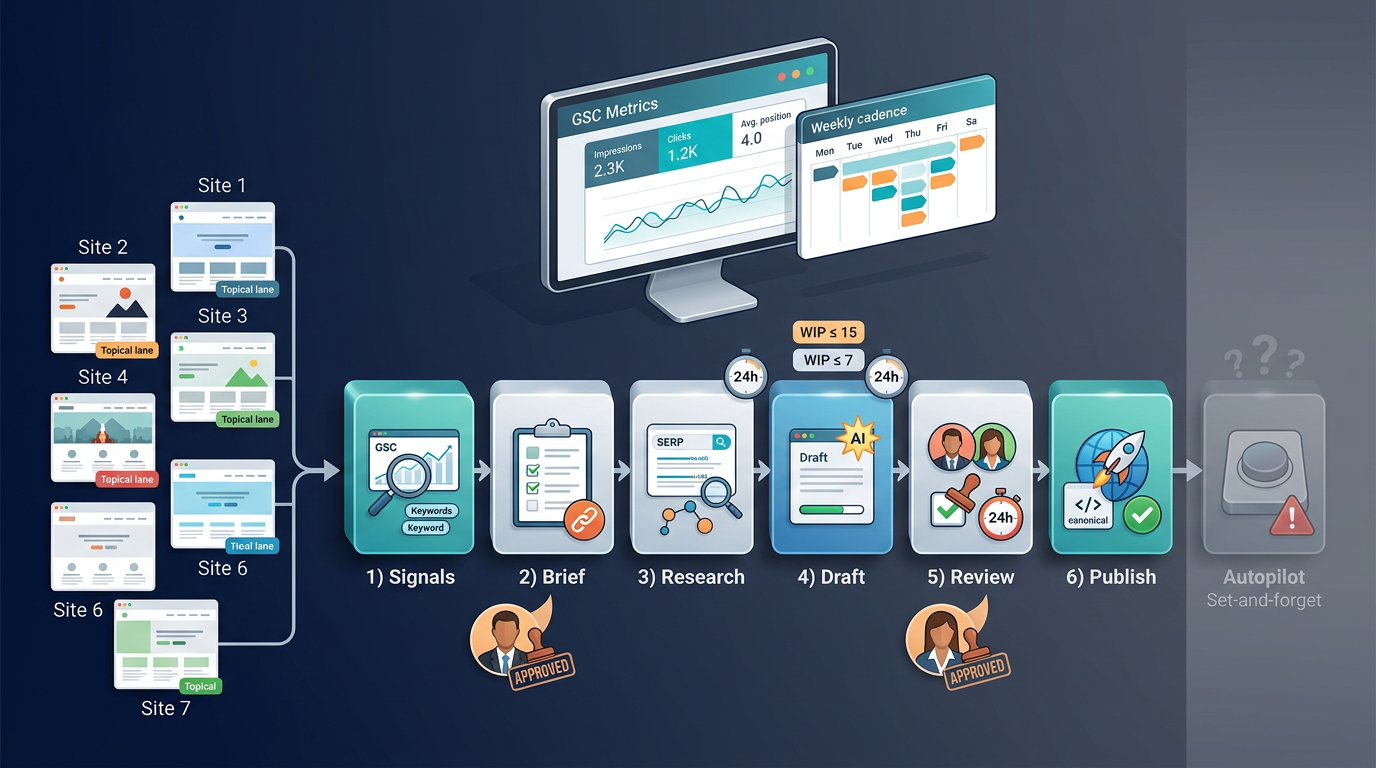
The distinction we landed on: autopilot software is a single tool running set-and-forget. An SEO agent pipeline is a governed system where each stage has defined inputs, outputs, owners, and exit criteria, with human checkpoints at the points that break rankings if skipped.
This playbook covers the 6-stage pipeline we run across all seven sites: Signals → Brief → Research → Draft → Review → Publish. Each stage operates as its own agent (automated where possible, human-gated where necessary), connected by a shared infrastructure of templates, WIP limits, naming conventions, and a weekly operating cadence. We measure everything at the GSC property level, per site.
Step 1: Define Your Multi-Site Architecture Before Anything Else
Before touching a single keyword, settle the infrastructure question. The wrong architecture creates friction at every subsequent stage.
Decision Framework: Separate Installs vs. Multisite vs. Headless
| Factor | 7 Separate WP Installs | WP Multisite | Headless/Decoupled |
|---|---|---|---|
| Plugin isolation | Full. Each site runs its own stack. | Shared. Network-activated plugins affect all sites. | Full. Each frontend is independent. |
| Security blast radius | Contained. One compromised site doesn't affect the other six. | Network-wide. One exploit can cascade. | Contained per frontend. API layer is shared risk. |
| User permissions | Granular per site. Straightforward role assignment. | More complex. Super Admin role creates over-privileged access. | Fully customizable but requires engineering. |
| Theme flexibility | Unlimited. Different theme per site. | Constrained. Themes must be network-compatible. | Unlimited. Any frontend framework per site. |
| Update maintenance | Higher effort. 7 separate update cycles. | Lower effort. One core update propagates. | Mixed. Backend updates are centralized; frontends vary. |
| Hosting complexity | Moderate. 7 hosting configs (can share one server with isolated directories). | Lower. One server, one database. | Higher. Requires API infrastructure plus separate frontends. |
| Autopilot tool compatibility | Broadest. Every CMS plugin and API integration works. | Limited. Some SEO plugins don't support Multisite properly. | Requires API/webhook support from tools. |
Our default recommendation: 7 separate WordPress installs. Broadest tool compatibility. Isolated failure domains. Simplest permission model per site.
When headless makes sense: your team has dedicated engineering resources, your content tools support API-based or webhook-based publishing, and you need frontend performance or design flexibility that WordPress themes cannot deliver. Based on the tools we've evaluated, capabilities vary: Nuanta offers auto-publish to 13+ integrations including static site generators via webhook, Distribb supports auto-publish to 9 CMS platforms with API docs available, and Frase supports auto-publish to WordPress, Webflow, and Sanity. Check each tool's current documentation to confirm support for your specific static site framework before committing to a headless architecture.
Shared Conventions Across All 7 Sites
Without naming standards and a shared tracker, your pipeline collapses into seven independent operations that happen to share a Slack channel.
- Naming standards: URL slugs follow
/{topical-lane}/{primary-keyword}format. Asset folders usesite-code/yyyy-mm/structure (e.g.,s3/2025-01/). Tags are drawn from a controlled vocabulary, not free-text. - Centralized content tracker: A single spreadsheet or project board with one row per article and columns for each pipeline stage: Signal Approved, Brief Created, Research Complete, Draft Done, QA Passed, Published, GSC Indexed. Each row is tagged to a specific site code.
- Unified CMS user roles per site: Exactly two publishing-relevant roles per install. Editor can create and edit drafts. Publisher can trigger the publish action. Nobody holds both roles on the same site without explicit override approval. This prevents unreviewed content from going live.
[Screenshot placeholder: Example row from our centralized content tracker showing one article moving through all 6 pipeline stages, with site code, topical lane, and status columns visible]
Step 2: Set Up the Signals Stage (Opportunity Detection)
What the Signals Agent Does
Surfaces keyword and topic opportunities per domain on a recurring weekly schedule. This is the intake valve for your entire pipeline. If it's noisy or unstructured, every downstream stage inherits the chaos.
Inputs:
- GSC data: queries, impressions, CTR, average position per property
- Rank tracker exports: position changes, new ranking URLs, lost positions
- Competitor gap reports: keywords competitors rank for that your sites don't
How to split signal ownership across 7 sites: Assign each domain a set of topical lanes at the outset. Site A owns technical SEO for SaaS, Site B owns local SEO for agencies, and so on. Every keyword cluster that enters the pipeline gets tagged to exactly one lane, which maps to exactly one site. This is how you prevent cross-site cannibalization before it starts.
Entry and Exit Criteria
- Entry: Scheduled weekly pull from GSC API and rank tracker. Automated via n8n workflow, a cron job, or built-in platform scheduling (tools like Nuanta's Signal Engine pull from 5 sources including GSC, competitor gaps, and community signals from Reddit and forums).
- Exit: Keyword clusters are approved by a human, tagged to a specific site, and logged in the shared tracker with the site code and topical lane assignment.
Tooling options (tool-agnostic): GSC API direct access, Semrush or Ahrefs for competitor gap analysis, or an n8n/Make workflow that pulls data automatically and deposits it into your tracker. Nuanta, Frase, and Search Atlas all offer native GSC integration for trend analysis and opportunity alerts.
WIP limit for this stage: No more than 15 unapproved keyword clusters in the queue across all sites at any given time. If you hit 15, stop pulling new signals and start approving or rejecting what's already there. This prevents a growing backlog that nobody triages.
Step 3: Build Briefs That Eliminate Rework
What the Brief Agent Does
Converts approved keyword clusters into structured content briefs. In our experience, a thorough brief is the single highest-leverage artifact in the pipeline because it eliminates the majority of revision cycles downstream. A missing or incomplete brief means your Draft stage produces content that fails QA and needs rewriting.
Brief template components:
- Target keyword and secondary keywords
- Search intent classification (informational, commercial, navigational, transactional)
- Required headings (H2/H3 structure)
- Entities to cover (people, tools, concepts, data points the SERP expects)
- Internal link targets: both within the target site and cross-links to the other six sites where topically relevant
- Word count range
- On-page checklist: meta title formula, description requirements, schema type
How We Standardize Briefs Across 7 Domains
One template. Domain-specific fields.
The core template is identical across all seven sites: same sections, same required fields, same structure. What varies per domain:
- YMYL flags: Sites covering health, finance, or legal topics get a mandatory compliance review checkbox added to their brief.
- Brand voice notes: Each site has a 2-3 sentence voice description embedded in its domain config (e.g., technical and direct, assumes reader has 2+ years of SEO experience vs. accessible, uses analogies, assumes beginner audience).
- Product references: If a site has associated products or services, the brief includes approved mentions and positioning language.
[Screenshot placeholder: Example content brief showing target keyword, intent classification, required headings, entity list, internal link targets across 3 sites, YMYL flag, and brand voice notes for one of our domains]
Entry criteria: Keyword cluster approved in Signals stage, tagged to a domain.
Exit criteria: Brief reviewed by a human editor. Internal link targets validated against all 7 sites (no two briefs targeting the same primary keyword on different sites). Brief moved to Research queue in the tracker.
WIP limit: Maximum 10 briefs in active creation at once across all sites. If you have 10 open briefs, finish or reject before starting new ones.
Step 4: Research and Draft Production With Built-In QA
Research Sub-Stage
What the Research Agent does: Performs SERP analysis on the target keyword, extracts entities from top-ranking pages, and audits competitor content against the brief's requirements.
Output: An enriched brief with:
- Data points and statistics found in top-ranking content
- Source URLs for fact-checking
- Content gaps: topics the brief covers that competitors miss, and vice versa
- A flag if the topic requires original data, expert quotes, or first-party research that AI cannot generate
Entry criteria: Approved brief from Step 3.
Exit criteria: Research summary appended to the brief document. If the topic is flagged as requiring expert input, it's routed to a human subject matter expert before moving to Draft.
Tools like Nuanta's multi-step Factbook and Frase's SERP-based research both automate portions of this. For a tool-agnostic approach, an n8n workflow can scrape SERP data, pull entity information, and append it to your brief template in the tracker.
Draft Sub-Stage
What the Draft Agent does: Generates a first draft from the enriched brief, following the heading structure, entity targets, word count range, and voice notes specified.
Tooling options:
- Full-pipeline platforms: Nuanta (Signal Engine → research → write → auto-publish to 13+ CMS integrations), Distribb (4,500+ word articles with auto-publish to 9 CMS platforms), Frase (research + long-form generation)
- Content generation with manual publishing: Surfer AI, Byword (bulk generation), Search Atlas Content Genius
- Custom workflow: n8n or Make connected to an LLM API (OpenAI, Anthropic, etc.) with your brief template as the system prompt
Per-site output targets: Most platforms in the mid-tier range produce roughly 30 articles per month at $59 to $149/month. At seven sites, that's approximately 4 articles per site per month at the lower end, which is a sustainable starting cadence before you've proven quality.
WIP limit: WIP limit: No more than 7 drafts in progress simultaneously. One per site maximum. This prevents the QA bottleneck described in our failure modes section.
Mandatory hold: 24-hour minimum between draft completion and review stage entry. This buffer exists for a reason. It prevents same-day publish cycles where nobody actually reads the content with fresh eyes.
Step 5: Review, QA Gates, and the Publish Checklist
Pre-Publish QA Gate (Non-Negotiable)
Every article passes through these checks before it can be approved for publishing. No exceptions, no post-publish fixes.
- Plagiarism and duplication check. Run every draft through a plagiarism scanner. Cross-check against your other six sites. This prevents the single biggest cause of ranking declines: that 48% failure rate from low-quality automated content identified in HubSpot's survey.
- On-page optimization score. Use SurferSEO, Clearscope, or Frase's optimization report to validate keyword coverage, entity inclusion, and content structure against the SERP. Target a score above the competitive threshold for the target keyword, not a perfect 100.
- Internal link validation. Confirm the article links to the correct targets within its own site. Confirm no other article across any of the seven sites targets the same primary keyword. This is your cannibalization firewall.
- Schema and structured data validation. Verify the correct schema type is applied (Article, FAQ, HowTo, etc.) and validates against Google's Rich Results Test. Nuanta and Search Atlas both generate FAQ schema automatically; if you're using a manual process, validate with Google's testing tool.
- Human editorial sign-off. A human reads the article for factual accuracy, brand positioning alignment, and compliance (especially for YMYL topics). This is the gate that AI cannot replace.
[Screenshot placeholder: Example QA gate checklist for a published article showing pass/fail status on plagiarism check, on-page score (with numerical result), internal link validation across 7 sites, schema validation result, and editor sign-off with timestamp]
The Publish Checklist (Per Article)
Before hitting publish, verify each item:
- URL slug matches naming convention (
/{topical-lane}/{primary-keyword}) - Meta title and description populated (not auto-generated defaults)
- Canonical tag set correctly (self-referencing unless deliberately canonicalizing elsewhere)
- Featured image uploaded with descriptive alt text
- All internal links functional (click every one; no broken targets)
- Redirect check completed if this article replaces or consolidates existing content (301 from old URL to new)
- CMS permission verification: the person clicking publish holds the Publisher role for this specific site
Rollback Plan
Before every publish, save a version in the CMS. If post-publish metrics signal problems within 7 days (sudden impression drop, indexing issues, cannibalization alerts), you need a clear revert path:
- Revert to the saved version
- If the URL has already been indexed, implement a 301 redirect to the most relevant existing page
- Log the revert in the shared tracker with the reason
Entry criteria: Draft passed all QA checks, editor approved.
Exit criteria: Article live, URL submitted to GSC for indexing via the URL Inspection tool or API.
Step 6: Post-Publish Monitoring and the Weekly Cadence
The Monitor Agent (Automated)
Publishing is not the finish line. It's the start of measurement.
- Indexing verification: Use the GSC URL Inspection API to confirm 100% of published pages are indexed within 7 days. Any page not indexed after 7 days gets flagged for manual inspection (crawl errors, noindex tags, thin content signals).
- Rank delta tracking: Monitor position changes per URL at 7-day and 30-day windows. Our internal rule of thumb: a new page settling into position 20-50 within the first week is typical early behavior. A page with zero impressions after 14 days warrants investigation into indexing status, content quality, or keyword targeting. These are not universal benchmarks; calibrate based on your domain authority and niche competitiveness.
- Cannibalization detection: Flag when multiple URLs from the same site rank for the same query. This should be caught pre-publish, but post-publish monitoring is the safety net.
- CTR anomaly alerts: If a page has high impressions but abnormally low CTR in GSC, flag for meta title and description review.
Minimum Instrumentation Per Site
| Requirement | Details |
|---|---|
| GSC property | One verified property per domain (7 total) |
| GSC API access | OAuth2 + service account configured for automated pulls |
| Centralized dashboard | Looker Studio with GSC connector per property, or n8n workflow pushing data to a shared spreadsheet |
| URL-level indexing log | Tracks publish date, first indexed date, and current index status per article |
Weekly Metrics Table
Track these numbers every Monday morning:
| Metric | Per Site | Across All 7 |
|---|---|---|
| Total clicks (7-day) | ✅ | ✅ Sum |
| Impressions (7-day) | ✅ | ✅ Sum |
| Average position (new content) | ✅ | ✅ Avg |
| New pages indexed this week | ✅ | ✅ Sum |
| Cannibalization flags | ✅ | ✅ Sum |
| Articles published this week | ✅ | ✅ Sum |
Our Weekly Operating Cadence
| Day | Activity | Owner |
|---|---|---|
| Monday | Signals review. Approve keyword clusters. Assign to sites. | Pipeline lead |
| Tuesday-Wednesday | Briefs created and enriched with research. | Brief agent + editor |
| Thursday | Drafts generated and placed in 24-hour hold. | Draft agent |
| Friday | QA review, editorial sign-off, publish approved articles. | Editor + Publisher |
| Saturday-Sunday | Monitor Agent runs automated indexing and rank checks. | Automated |
Handoff points defined clearly:
- Signals → Brief: Pipeline lead approves cluster, tags to site, brief agent picks it up
- Brief → Research: Editor approves brief, moves to Research queue
- Research → Draft: Research summary appended, draft agent picks up enriched brief
- Draft → Review: 24-hour hold expires, article enters QA queue
- Review → Publish: Editor signs off, Publisher role executes publish
This cadence means each article takes a minimum of one full week from signal approval to publication. That's intentional. Compressing this into fewer days is where quality gates get skipped.
Realistic Cost Model for 7 Sites
Monthly Stack Breakdown
The knowledge base provides per-article costs at various plan tiers. We use those to project monthly spend based on target output volume.
Reference cost per article from published plan pricing:
| Tool | Plan | Per-Article Cost | Notes |
|---|---|---|---|
| Frase | Starter ($49/mo) | ~$4.90 | 10 articles, research + optimization |
| Frase | Professional ($129/mo) | ~$3.23 | 40 articles, 3 seats |
| Frase | Scale ($299/mo) | ~$2.99 | 100 articles, 5 seats |
| Nuanta | Solo | ~$9.80 | 5 articles, 1 project |
| Nuanta | Writer | ~$6.60 | 15 articles, up to 5 seats |
| Nuanta | Publisher | ~$3.98 | 50 articles, 50 seats, unlimited projects |
| Distribb | Pro | ~$3.23 | Full pipeline + backlink exchange + social |
| Byword | Scale | ~$3.33 | Bulk generation + CMS publish |
| Surfer SEO | Essential ($99/mo) | ~$19.80 | 5 AI articles (content editor is the core value) |
| Surfer SEO | Scale ($219/mo) | ~$10.95 | 20 AI articles |
| Clearscope | Essentials ($129/mo) | ~$6.45 | Optimization reports, not generation |
| Jasper | Pro ($69/mo) | ~$0 (fair use) | AI writing only, no SEO or publish |
Budget tier ($133-$413/month for content tools): Combine a lower-cost generation tool with GSC-only rank tracking and manual SERP review for on-page scoring.
Mid-tier (approximately $500-$800/month): Add Semrush Pro at $120/month for rank tracking and SurferSEO at $89/month for on-page scoring on top of a mid-range content generation tool. Exact total depends on which content platform and plan you select from the table above.
Premium ($1,100-$1,400/month with per-site automation): Stack multiple specialized tools (e.g., a full-pipeline content platform plus dedicated rank tracking at Ahrefs $199/month plus SurferSEO Scale at $219/month). This tier makes sense when you need tool-level isolation per domain or high-volume output.
Hidden Costs To Budget For
The sticker price of your content stack is a fraction of actual total cost of ownership. The outline specifies, and our experience confirms, that TCO runs 2 to 3x the list price of your tools when you account for:
- Residential proxies and CAPTCHA solving: Required if you're running competitor research tools or scraping SERPs at scale. Costs vary widely by provider and volume.
- Email verification services: For outreach-based link building tools.
- VPS hosting: If running n8n self-hosted, custom scrapers, or link-building automation.
- Human review hours: 14 to 35 hours per week for 7-site monitoring and QA. That's a part-time to full-time role.
Budget the infrastructure line items based on your specific tool choices and usage volume. The 2-3x multiplier is directional guidance, not a precise formula.
Cost Per Published Page Calculation
Formula: (monthly tool spend + monthly labor cost) / articles published that month
Below is a worked example using three labor-rate scenarios. All numbers are example assumptions for illustration; substitute your actual rates and hours.
| Scenario | Tool Spend | Labor Hours/Week | Hourly Rate | Monthly Labor | Articles | Cost Per Page |
|---|---|---|---|---|---|---|
| Low | $500 | 14 | $25 | $1,517 | 30 | ~$67 |
| Base | $700 | 20 | $35 | $3,033 | 30 | ~$124 |
| High | $900 | 35 | $50 | $7,583 | 30 | ~$283 |
That per-page number drops as you scale articles without proportionally increasing labor hours. Automation ROI break-even is typically 10 to 15 sites. At 7 sites, you're not there yet on pure automation savings. What pushes you into positive territory at this scale is shared templates, WIP limits, and the pipeline structure itself reducing rework and wasted effort.
Failure Modes That Break Multi-Site Pipelines
Every failure mode below has a specific structural fix built into the pipeline stages above. We list them here so you can audit your own implementation.
Cannibalization across domains. Two of your seven sites targeting the same keyword cluster. This happens when signal ownership isn't enforced. The fix is in Step 2: topical lane assignments per domain, validated at the brief stage, and monitored post-publish.
QA bottleneck. All seven sites dumping drafts into review at once. Friday becomes a 12-hour review marathon, quality drops, articles get waved through. The fix: WIP limits (max 7 drafts in progress, one per site) and staggered publish windows.
Thin-content velocity signal. Publishing too many low-quality pages per week per site can trigger Google's quality algorithms. The fix: rate limits on output (4-5 articles per site per month at launch), the mandatory 24-hour hold between draft and review, and the non-negotiable QA gate in Step 5.
CMS permission drift. A team member with draft-only permissions gets upgraded to Publisher on one site temporarily and starts pushing unreviewed content live across multiple properties. The fix: quarterly permission audits, strict role enforcement (Editor drafts, Publisher publishes), no combined roles without documented override.
Ignoring post-publish data. Articles go live and nobody checks whether they indexed, ranked, or cannibalized existing content. The fix: the Monitor Agent in Step 6, the weekly metrics table, and the Monday signals review that incorporates last week's performance data.
From HubSpot's 2024 survey: among the 25% of marketers who experienced ranking declines from automation, 31% of declines came from spammy backlink patterns and 21% from over-optimization. Both are preventable with the QA gates and human checkpoints in this pipeline.
Where Most Teams Stall After Launch (And What to Prioritize in Week 2)
The pipeline is built. The first articles are published. The weekly cadence ran once. And then everything quietly stops.
The number one stall point is not technical. It's discipline. Teams build the full 6-stage pipeline, run one cycle, and then skip the Monday signals review the following week. Within three weeks, the tracker is stale, drafts are being published without QA, and the pipeline exists only as a document nobody opens.
Prioritize monitoring instrumentation over adding more content volume in weeks 2 through 4. Prove lift on the first 10 to 15 articles per site before scaling output. If your first batch isn't indexing within 7 days, adding more articles won't fix the underlying problem. It will make it harder to diagnose.
The single metric to watch in weeks 2 through 4 is GSC impressions per new URL. Impressions are the leading indicator. They appear before clicks materialize. If new articles are accumulating impressions in the 20-50 position range within their first two weeks, the pipeline is working. If impressions are flat or zero after 14 days, investigate indexing, content quality, or targeting issues before publishing another batch.
Second priority after proving initial lift: run your first cannibalization audit across all seven sites after 30 days of publishing. Pull the GSC query report for each property, sort by overlapping queries, and flag any cases where two different sites (or two different URLs on the same site) are competing for the same query. This audit takes 2-3 hours across seven properties and prevents the compounding damage of cross-site keyword conflict.
Third priority: refine your brief template based on real outcomes. After your first 30-day cycle, compare the brief completeness of articles that reached page 1 versus those that stalled outside the top 20. Look at entity coverage, heading structure, internal link count, and word count. The patterns will tell you which brief components actually predict ranking success for your specific domains, and which fields are filler that can be simplified or removed. This feedback loop, from published performance back to brief structure, is what turns a static pipeline into an improving system.
Useful materials
- SEO trends for 2026: How search and AI are changing (HubSpot survey of U.S. SEO professionals)
- How To Automate The URL Inspection API
- CA/Browser Forum Baseline Requirements for the Issuance and Management of Publicly-Trusted Certificates
- ROI Calculator for Robotic Automation (Multi‑Robot / Multi‑Site Scenarios)